Overview
Bird’s AI View started with a simple question:
Why do security systems still force people to mentally stitch together multiple camera feeds just to understand what’s happening in one space?
We built a prototype that transforms standard camera footage into a real-time, bird’s-eye activity map, automatically and with minimal setup. This case study explains the core approach, the key design choices, and what we’re improving as we scale.
The Problem
Security cameras are everywhere, but they still share a core limitation: they don’t provide spatial context.
Even when an incident is visible, it’s often unclear where it’s happening relative to the rest of the building. Operators are left interpreting multiple angles under time pressure, when time matters most.
Goals
We designed Bird’s AI View to:
- Turn normal camera footage into a top-down map of activity
- Keep setup simple and mostly automated
- Overlay real-time person locations
- Work with existing camera infrastructure and low-cost hardware
Core Idea
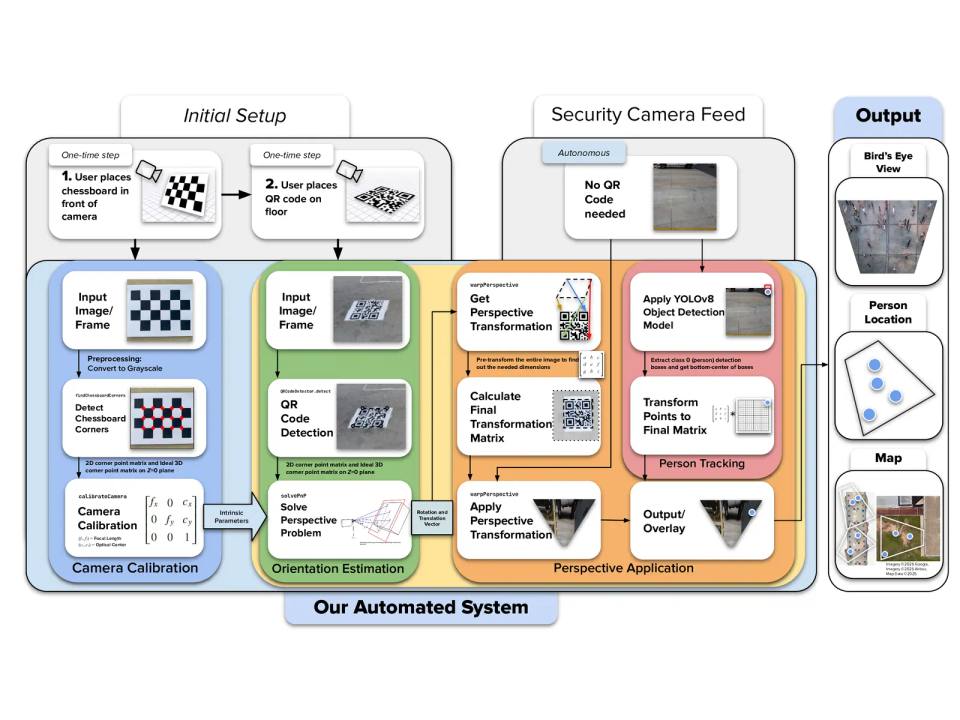
We treat the floor as a flat plane in 3D space. If we can estimate how a camera views that plane, we can mathematically “undo” perspective and generate a top-down view.
That requires four core components:
- Camera calibration — estimate the camera’s internal geometry
- Floor orientation — estimate the camera’s pose relative to the floor
- Perspective transformation — compute a mapping to bird’s-eye space
- AI detection — detect people and project their positions onto the map
System Architecture
1) One-Time Camera Calibration
The user shows a simple printed reference pattern to the camera. From this, the system estimates:
- focal characteristics (how “zoomed” the camera is)
- optical center (image center-of-projection)
- lens distortion (warping from real lenses)
This step allows later geometry to be consistent and scalable.
2) One-Time Floor Orientation Setup
The user places a printed marker on the floor. The system detects the marker corners and uses a pose-estimation method to determine the camera’s orientation relative to the ground plane. From that, we generate a bird’s-eye transformation aligned to the floor.
3) Live Operation
Once configured:
- frames stream in from the camera
- the detector finds people
- we select a consistent “ground contact” point for each person (a floor-intersection proxy)
- those points are transformed into bird’s-eye space
- results are rendered as a live activity map
After setup, the system can operate continuously without needing the marker visible.
Key Engineering Decisions
Why a Marker-Based Approach?
We wanted setup to be fast and repeatable without requiring users to measure distances or manually click points. A printed marker provides a clean, robust reference for pose estimation and scale.
Why QR Codes (Instead of Only Calibration Grids)?
Traditional calibration grids can be unreliable under common security-camera conditions (distance, compression, low resolution). QR-style markers are:
- high-contrast and easy to detect
- robust to blur and partial degradation
- widely supported in computer vision tooling
- simple to print and deploy
So we used them as the floor reference marker to keep setup consistent.
Perspective Transformation Strategy
With camera intrinsics and a floor marker pose, we compute a mapping (homography) that reprojects the floor plane into a top-down view. We then apply this mapping to:
- generate the bird’s-eye image
- project detected person locations into the same coordinate system
This creates a single spatial view where positions remain consistent across time.
Person Mapping Choice
Object detectors return bounding boxes, not true 3D positions. We needed a practical approximation for “where the person is on the floor.” We use a consistent point derived from the detection box that best represents ground contact, then transform that point into bird’s-eye space.
This gives stable tracking without extra sensors.
Tech Stack
Software
- Python
- OpenCV + NumPy for geometry and transforms
- A modern real-time object detection model for person detection
Hardware
- Runs on consumer-grade devices and typical camera feeds
What the Prototype Proved
Our first prototype demonstrated that:
- a bird’s-eye activity map can be generated from standard camera footage
- setup can be reduced to a couple of user-friendly steps
- AI detections can be projected into a floor-aligned coordinate system
- the output is dramatically easier to interpret than multiple camera feeds
In short: it’s feasible, useful, and scalable.
What We’re Optimizing Now
We’re currently focused on turning the prototype into something production-ready:
- Multi-camera fusion: combining multiple views into one unified map
- Performance: reducing latency and improving throughput
- Usability: building a cleaner operator interface and better defaults
- Higher-level intelligence: moving beyond “dots on a map” toward behavior + incident cues over time
Why This Matters
Bird’s AI View has the capability to turn surveillance from:
“Watch a wall of screens and infer the situation”
to:
“See one map and understand the space instantly.”
That reduces cognitive overload, improves response clarity, and lowers the barrier to deploying smarter monitoring, without requiring specialized infrastructure.
Conclusion
Bird’s AI View is a first step toward making building security more intuitive: a system that converts camera feeds into spatial understanding and highlights activity automatically.
The prototype proved the core concept. Now we’re refining it into a faster, more scalable system that can support larger spaces, more cameras, and smarter interpretations of what’s happening, not just where.